File No. SCE-2026 — Status: Open

Open a case on every lead worth chasing.

Capture one public post, profile, or product page — get a scored prospect, a drafted outreach message, and five content ideas for your own channel, all pulled from the same evidence. Nothing sends itself. You review everything first.

● Local-first — your captures stay in your browser

Watch first: how one click replaces 40 open tabs of half-finished lead research.

Free Starter Kit · Immediate Access

Get your Social Signal Starter Kit

Receive the six-page decision and content workbook, Social Companion Free, and the Free Tools directory.

Your kit appears immediately and is sent by email. You may also receive relevant product information; unsubscribe anytime. See Chain of Custody.

Exhibit A

One capture. Four case files.

Every click on the side panel opens a single evidence record. That one record is what feeds all four modules below — no re-entering anything, no separate research pass.

Evidence Record

One captured page

Post text, buyer-intent signals, product data, or SEO audit — pulled automatically on capture.

Case 01

Decision Center

Turns the record into a scored prospect, with the exact reasons behind the score shown to you.

Case 02

Outreach Studio

Drafts a personalized first-touch message and spaced follow-ups. You send, it never does.

Case 03

Content Generator

Same evidence, five short-form video or post angles for your own channel instead.

Case 04

Site Intelligence

An SEO/offer audit of the page itself — titles, links, schema, missing alt text.

Evidence Record

One captured page

Post text, buyer-intent signals, product data, or SEO audit — pulled automatically on capture.

Case 01

Decision Center

Turns the record into a scored prospect, with the reasons behind the score shown to you.

Case 02

Outreach Studio

Drafts a personalized first-touch message and spaced follow-ups. You send, it never does.

Case 03

Content Generator

Same evidence, five short-form video or post angles for your own channel instead.

Case 04

Site Intelligence

An SEO/offer audit of the page itself — titles, links, schema, missing alt text.

Exhibit A, on video

Watch one lead become all four case files

A single capture, followed start to finish: the explainable score, the first message, and five content ideas pulled from the same evidence.

  • Capture from the side panel or right-click
  • See exactly which signals earned the score
  • Approve every draft yourself
Get the free Starter Kit →
Case Index

What's in the file

01 · CAPTURE

One-click evidence capture

Page, social post, or product listing — from the side panel or right-click menu.

02 · SCORING

Explainable scoring

Every score comes with the specific evidence it was based on, not a black-box number.

03 · SEQUENCES

Spaced follow-ups

Assign a prospect a follow-up cadence; each message is freshly drafted, never repeated.

04 · ROUTES

Disclosure-first links

Trackable campaign links that tell the visitor exactly why they're seeing it before they click through.

05 · GOVERNANCE

Retention & redaction

Set how long captures are kept, block sensitive domains, and redact emails automatically.

06 · PORTABILITY

Your data, exportable

Full JSON backup, plus CSV export for prospects and routes on Agency-tier plans.

Connected Tool Suite

Start with the extension. Carry the work into your connected tools.

Social Companion is a connected research-to-revenue workflow. Capture useful public evidence, turn it into prospects and content direction, organize the work in Command Center, then use VidSprout to build reviewable narrated and captioned YouTube videos.

Capture in Chrome→Review in Elite→Manage in Command Center→Create in VidSprout
What the software does

It preserves the useful context behind a social post, profile, video, or web page so it can be reused without copying the same information into multiple tools. You stay in control: scores are explained, AI output is reviewed, and no message or post is sent automatically.

Premium & Connected Products

Full workflows for research, campaigns, and video.

CHROME EXTENSIONFREE ENTRY

Social Companion Elite

Capture posts, profiles, videos, offers, and websites while you browse, then organize the evidence in one local-first dashboard.

  • 15 free captures and 5 scored prospects
  • Evidence capture, scoring, outreach, and routes
  • Platform and niche segmentation
NETLIFY WEB APPCONNECTED APP

Social Companion Command Center

Open exported Signal Passports in a larger browser workspace for pipeline review, prospect organization, next actions, content, and campaign oversight.

  • Imports only when you choose a file
  • Prospect, content, route, and platform views
  • Local browser workspace with portable export
ELITE OTO MODULE

PlatformSignal IQ

Turn deeper platform captures into channel intelligence, packaging audits, keyword maps, engagement context, and monetizable content or software opportunities.

  • TubeSignal plus X, LinkedIn, Instagram, TikTok, and Facebook views
  • Evidence-grounded content and OTO opportunity generation
  • Carries platform intelligence into Command Center
AGENTIC MARKET INTELLIGENCE

RedditSignal IQ

Keep the full research mission inside Social Companion Elite while specialized agents turn structured Reddit evidence into customer pain points, solution opportunities, and reviewable leads.

  • In-app research plan and Evidence Reader—no automatic Reddit tabs
  • Interface-noise rejection, exact excerpts, and explainable scores
  • Pain-plus-intent lead candidates connected to the governed workflow
AI VIDEO STUDIO

VidSprout

Turn a keyword or source URL into a reviewable script, voiceover, visual plan, captions, and finished video, then send approved work to connected YouTube channels as private drafts. Paid VidSprout access is included as a FREE OTO with qualifying SCE packages.

  • AI-assisted scripts, images, narration, captions, MP4, and SRT
  • Multiple YouTube channel connections through Google OAuth
  • Private-draft upload and metadata re-optimization workflows
Free launch kit
  1. Download the 7-Day YouTube Launch Checklist.
  2. Plan and review your first three-video batch.
  3. Open VidSprout when you are ready to create.

FREE OTO: SCE Pro includes VidSprout Starter. SCE Agency includes VidSprout Pro. Create VidSprout with the same purchase email and the included access applies automatically.

YOUTUBE CAMPAIGN CAPTURE

VidSprout Companion

Capture the current YouTube video’s title, description, source, thumbnail reference, and available transcript into a VidSprout-ready campaign package.

  • Free capture and campaign-package export
  • Explicit click-to-capture privacy control
  • $27 one-time Creator upgrade path for the expanded VidSprout workflow
From research to campaign
  1. Open a YouTube video and click Capture.
  2. Import the JSON package into VidSprout.
  3. Rebuild it as an original Script Studio, avatar, affiliate, YouTube, or WordPress campaign.

Free remains usable. The Creator upgrade is a one-time purchase, not a subscription. Checkout stays request-based until automated payment and fulfillment verification is complete.

AI CAMPAIGN STUDIO

PulseForge AI OS

Turn an offer, URL, or idea into coordinated social posts, hooks, CTAs, video hooks, email copy, and optional campaign imagery using your own AI-provider key.

  • Freemium entry with three campaigns
  • Starter $12.95 · Pro $17 · Elite $27
  • One-time early-access pricing through PayPal

Direct social posting requires a separately configured and authorized developer connection for each platform.

Free Specialist Tools

Four focused tools—useful before you upgrade.

Each Lite tool solves one focused problem with transparent inputs. Social Companion Elite adds capture, persistence, cross-module workflows, and Command Center carryover.

SEARCH INTELLIGENCEFREE LITE

SearchSignal Lite

Import a real Google Search Console CSV and flag transparent search optimization opportunities.

  • No Google credentials required
  • No simulated traffic
  • Runs in your browser
How to use
  1. Export Pages or Queries from Search Console.
  2. Upload the CSV.
  3. Review high-impression and position 4–20 opportunities.
YOUTUBE RESEARCHFREE LITE

OutlierSignal Lite

Supply visible YouTube metrics and rank qualifying videos by view-to-subscriber ratio.

  • Adjustable thresholds
  • Transparent derived ratio
  • Unknown metrics excluded
How to use
  1. Gather each video's title, channel, subscribers, and views.
  2. Paste one video per line.
  3. Set thresholds and review the ranked outliers.
LOCAL SEO PLANNINGFREE LITE

LocalGrowth Lite

Turn real services and locations into a reviewable hub-and-spoke site coverage plan.

  • No automatic publishing
  • No ranking promises
  • Human-review workflow
How to use
  1. Enter your primary market.
  2. Add services and areas served.
  3. Generate and review the proposed site structure.
AI AGENT PLANNINGFREE LITE

AgentBuild Lite

Turn a repetitive task into a governed agent workflow, connector plan, readiness score, and starter build prompt.

  • Human approval controls
  • Transparent readiness score
  • No automatic execution
How to use
  1. Describe the role, repetitive task, tools, and result.
  2. Choose frequency and approval policy.
  3. Generate your blueprint and starter build prompt.

Free and Premium are labeled before you click. Netlify securely captures tool and lead-magnet requests through the existing Social Companion intake. Qualifying SCE packages automatically provision the VidSprout FREE OTO to the same purchase email.

The real bottleneck

You do not need more tabs. You need the useful context to survive the trip.

Social feeds, profiles, product pages, and websites are full of buyer language and content ideas. The problem is that screenshots, bookmarks, notes, and drafts all end up separated.

The pain

You spot a promising X post, open the profile, check the offer, save a link, and intend to follow up later. By the time you return, the reason it mattered is gone.

The solution

Capture the public page once. Social Companion Elite keeps the evidence together, explains the prospect score, drafts a relevant message, and turns the same insight into content ideas.

The 40-tab problem in under a minute

You have seen this tab bar before.

A hot lead on X, their profile, their offer, a note you meant to finish. Three days later the reason it mattered is buried. This short shows the one-click fix: capture it once and the context stays attached to the lead.

Try it free: 15 captures, no license key →
Illustration of a public social post and website being captured into prospect scoring, outreach, and content cards
Works across the web

From X-style posts to product and profile pages

Use the Chrome side panel or right-click capture on public social posts, profile pages, product listings, landing pages, and ordinary websites.

1 · CapturePreserve the public text, page context, and source URL.
2 · DecideReview an explainable score and the exact signals behind it.
3 · CreateDraft outreach or turn the evidence into content for your own channel.
4 · ApproveYou edit and send. Nothing auto-posts or auto-messages.
Inside the extension

One dashboard for social research, decisions, drafts, and routes.

Interface previews use representative sample data. Your real captures remain in your browser unless you explicitly export or send them.

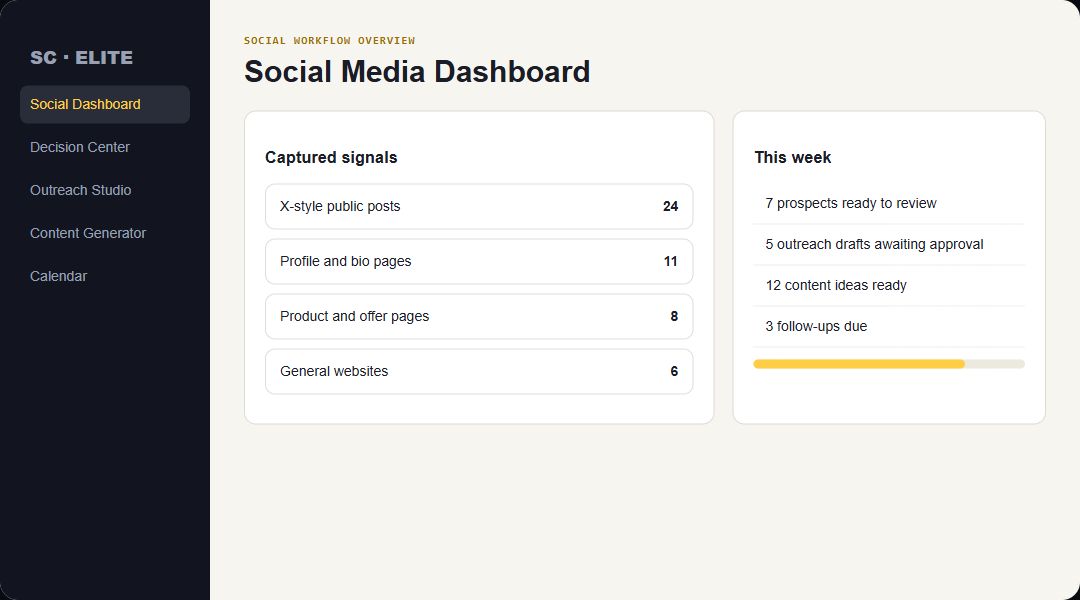
Social Companion Elite social media dashboard preview

Social Media Dashboard

See captured signals from X-style posts, profiles, offer pages, and websites alongside drafts, content, and follow-ups due.

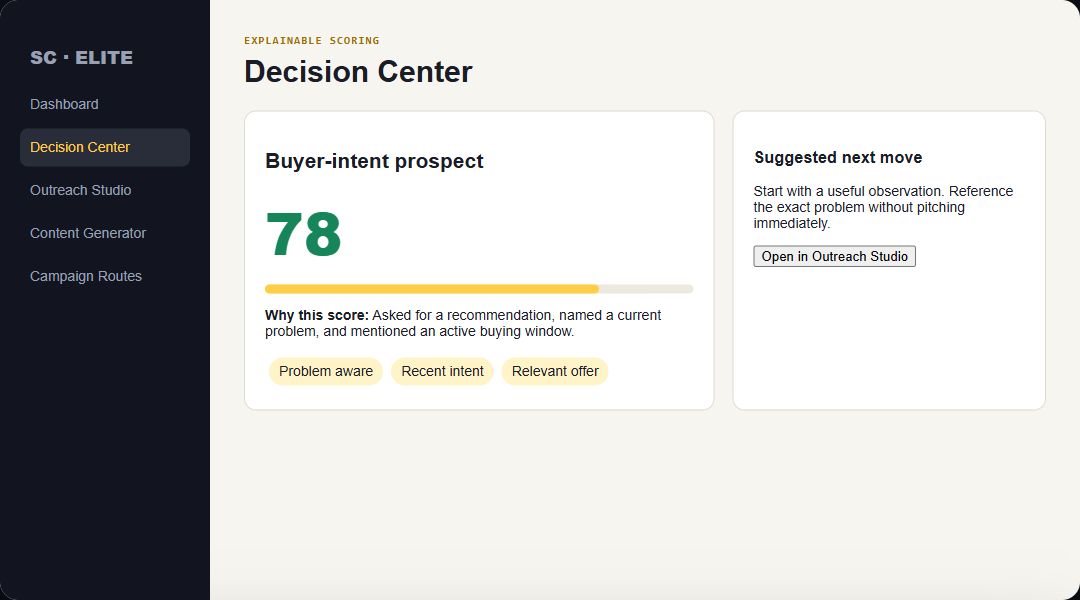
Decision Center interface preview with explainable prospect score

Decision Center

Prioritize the prospects worth a closer look and see why each score was earned.

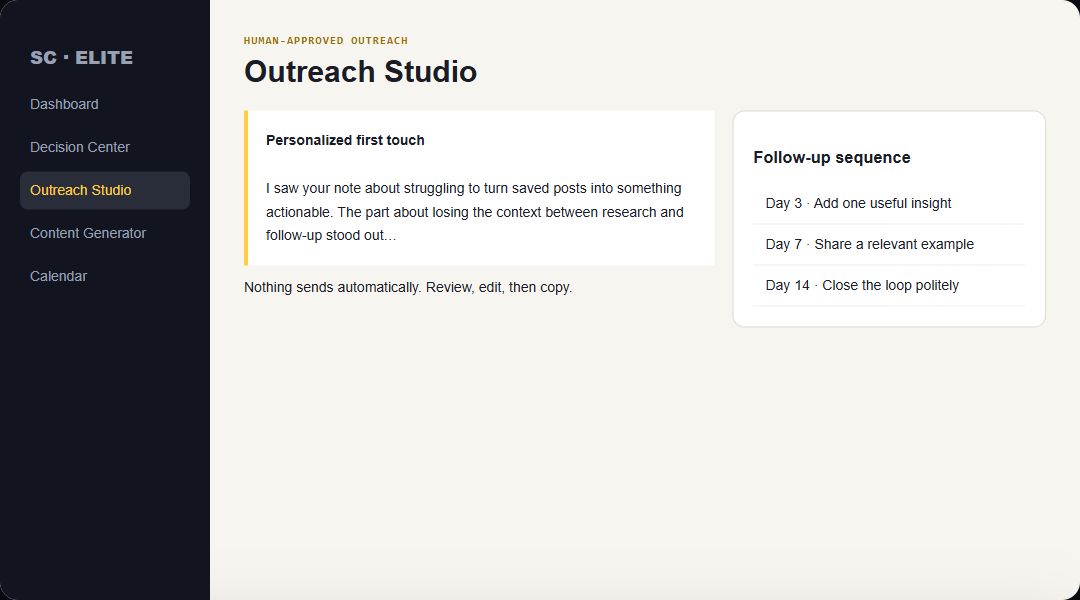
Outreach Studio interface preview

Outreach Studio

Draft first-touch messages and spaced follow-ups grounded in the captured context. Review before sending.

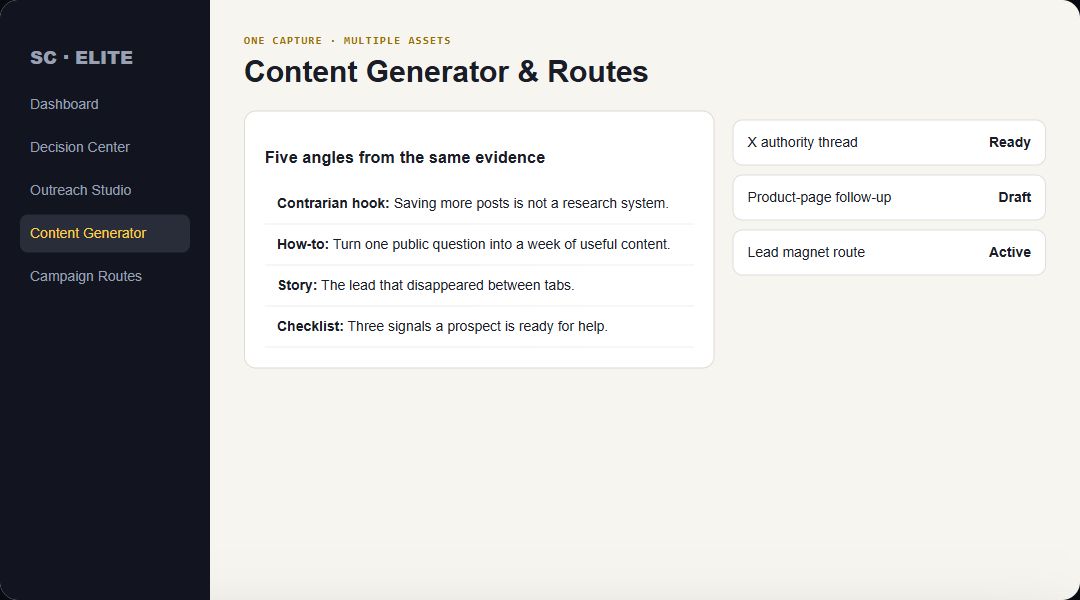
Content Generator and campaign route interface preview

Content & Campaign Routes

Turn the same evidence into hooks, posts, short-form video angles, trackable links, and handoff-ready campaigns.

Monetization workflows

Turn research into revenue without turning your account into a spam machine.

The extension organizes the work; you supply the judgment, relationship, offer, and final approval.

Sell services

Find public problem language, prepare a relevant audit or observation, and open a thoughtful conversation.

Promote offers

Build disclosure-first campaign routes for your products, affiliate offers, free resources, or booked calls.

Create authority content

Convert repeated buyer questions into posts, X threads, short videos, newsletters, and follow-up content.

Sell services: the generic-DM teardown

A before-and-after on one anonymized lead. The "love your content, hop on a call?" message versus a first line about their actual problem.

Create authority content: stop brainstorming

Every complaint, question, and "this isn't working" post from a prospect is a content idea in their own words. Here is how to capture it before it disappears.

60-second breakdowns

Social selling, one short at a time.

Quick, practical breakdowns you can use today, with or without the extension. New ones ship to the YouTube channel every week.

1 lead → 5 posts

The four-step capture, decide, create, approve stack.

Generic DM vs personal DM

The three-question check before you hit send.

Stop brainstorming content

Turn prospect complaints into your content calendar.

More DMs ≠ more clients

Why one relevant message beats fifty copy-paste ones.

VidSprout video walkthroughs

VidSprout: one keyword to one video

Brief, look & sound, output, review, then upload to YouTube as a private draft. Get the free Launch Kit →

VidSprout Companion: any video to research

Capture a video's title, description, and transcript in one click, then build your own original version. About the free Companion →

Get the free Starter Kit →Subscribe on YouTubeVideos use an AI presenter. The workflows and tools shown are real.
Access Levels

Start free. Upgrade when the workflow earns its place.

Choose Free, a monthly token plan, or lifetime Pro. Paid activation will reopen after automated licensing and token fulfillment pass verification.

FREE$0

Try the core workflow before buying.

  • 15 page or social captures
  • 5 scored prospects
  • Single-message outreach drafts
  • 1 active campaign route
No license key requiredStart Free
STARTER$47

For focused prospect research and expanded workflows.

  • Expanded captures and prospects
  • Explainable prospect scoring
  • Personalized outreach drafts
  • Starter campaign workflows
One-time license · checkout verification pendingRequest Starter Access
AGENCY$147

For client work, market intelligence, and governed team usage.

  • Everything in Pro
  • RedditSignal IQ Mission Control
  • Evidence-backed campaign packages
  • CRM and client-ready workflows
  • VidSprout Pro FREE OTO
One-time license · checkout verification pendingRequest Agency Access
Questions before you install

Frequently asked questions

Is there a video walkthrough?

Yes. Start with the 40-tab walkthrough at the top of this page, see one lead become all four case files in Exhibit A, or watch the 60-second breakdowns. New videos go up on the YouTube channel every week.

Does it automatically message or post for me?

No. It drafts and organizes. You review, edit, copy, publish, or send each item yourself.

Which pages can I capture?

Public X-style social posts, profiles, product and offer pages, landing pages, and ordinary websites. Some sites may limit what a browser extension can read.

Where is my captured information stored?

Core capture data stays in your local browser unless you explicitly export it or send it through a configured integration.

Do I need an AI account?

AI-assisted scoring, drafts, and content require either your own supported provider key or a configured AI Gateway. Core capture and organization remain available without it.

How do paid plans work?

Starter, Pro, and Agency are one-time purchases through secure PayPal checkout—there is no recurring subscription.

What happens after I buy?

Complete checkout with the email where you want to receive your Social Companion Elite access and purchase details.

What is the FREE OTO included with Pro and Agency?

Pro includes VidSprout Starter package access, and Agency includes VidSprout Pro package access, at no additional charge. Create or sign in to VidSprout using the same email used at SCE checkout; the included plan is applied automatically. Pro buyers can later upgrade through the SCE Agency upgrade path.

How are updates delivered?

The extension checks the official release feed and shows an Update available banner when a newer buyer ZIP is published.

Can I use this for clients?

Agency adds CSV exports and webhook handoff for client and CRM workflows. You remain responsible for consent, platform rules, and appropriate outreach.

Chain of Custody

Where your information actually goes

No black boxes. Here's the literal path your email and license data take — and where you can check on them yourself.

01
You submit the form above

Your email (and name, if given) is sent to our intake service, hosted on Netlify — not a third-party ad platform, not a data broker.

02
Netlify stores it, Resend sends your email

Your email is stored directly on our Netlify backend — no third-party marketing platform in the loop. Resend, a transactional email service, is who actually delivers your confirmation and access emails.

03
Your license is validated by Cloudflare

Your active license key and tier are controlled by the dedicated Cloudflare Worker. Netlify keeps only the lead or fulfillment record needed for support and delivery.

04
You can monitor it from inside Chrome

Open the extension's Settings → License panel anytime to see exactly what's on file for you — no separate portal, no support ticket required.

05
Everything else stays local

What you capture while using the product — posts, pages, drafts — stays in your own browser unless you explicitly export or send it.

06
Command Center handoff stays in your control

Elite exports a Signal Passport JSON only when you request it. You then choose that file in the separate Social Companion Command Center; nothing syncs automatically and the imported workspace remains in that browser.

Free Workflow · Immediate Access

Start with one real signal and a clear next action.

Social Signal Starter Kit

Send me the free kit